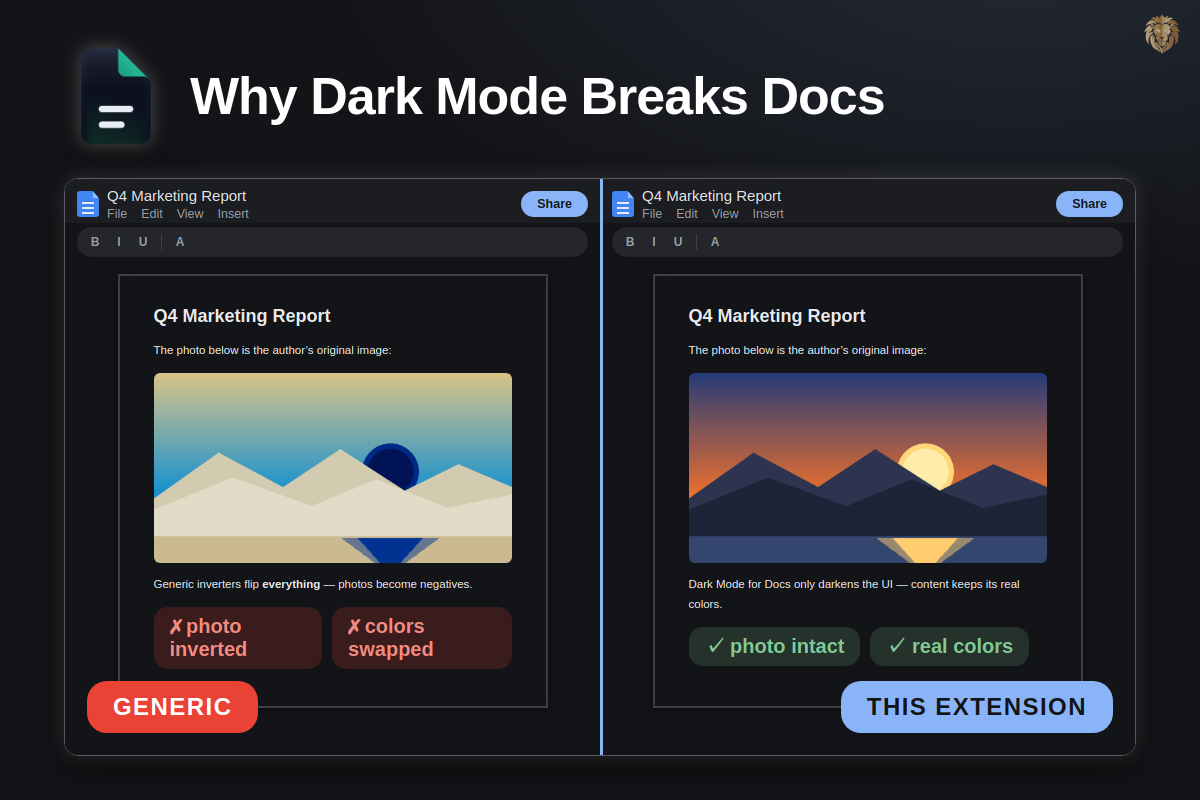
You install a dark mode extension, open Google Docs — and every photo is a negative, every chart has swapped colors. That's not bad luck: it's how generic inverters work, and it can't simply be fixed.
Short answer: Generic dark mode extensions apply a whole-page color inversion. They can't tell "white page background" from "white inside a photo" — so your content inverts along with the interface. A purpose-built extension styles only the editor UI and leaves document content untouched.
How generic dark mode extensions work
Almost all of them use one trick: filter: invert(100%) hue-rotate(180deg) applied to the entire page (or a "dynamic" variant that recolors every element it finds). That's what makes them work on every website — and exactly what breaks inside a document editor.
What breaks inside Google Docs
- Photos & screenshots render as color negatives
- Charts swap series colors — red becomes cyan
- Cell colors & conditional formatting in Sheets lose their meaning
- Highlight colors and the color picker show inverted swatches — you pick yellow, your collaborators see blue
- Comment and suggestion colors shift, which makes review workflows confusing
Why they can't just "fix it"
The filter operates on pixels and computed colors, not on meaning. There is no reliable way for a page-wide inverter to know which element is "document content" — Google renders Docs as deeply nested DOM (and canvas in Slides), the markup changes constantly, and image elements look like any other. Per-element exception lists are fragile by design: a structural limitation, not a bug awaiting a patch. It's also the most common complaint across dark-mode extension reviews — inverted images inside documents.
What a purpose-built extension does differently
Dark Mode for Docs doesn't invert anything. It ships hand-written dark styles for the editor interface — toolbar, menus, sidebars, comments, filmstrip — and never touches the content surface:
| Generic inverter | Dark Mode for Docs | |
|---|---|---|
| How it works | Inverts all page colors | Targets UI elements only |
| Images in documents | Negatives | Real colors |
| Charts & cell colors | Swapped | Accurate |
| Color picker | Inverted swatches | True |
| Scope | Every website | docs.google.com only |
The setup most people end up with
- Keep your generic dark mode for the rest of the web.
- Exclude docs.google.com from its site list.
- Add a purpose-built extension for Google's editors.
More on the biggest generic tool: Dark Reader vs. a purpose-built alternative →
Dark UI, real colors.
Free on the Chrome Web Store and Firefox Add-ons — Docs, Sheets and Slides.
FAQ